 Lunch Money Developer Portal
Lunch Money Developer Portal
Lunch Money Developer Portal
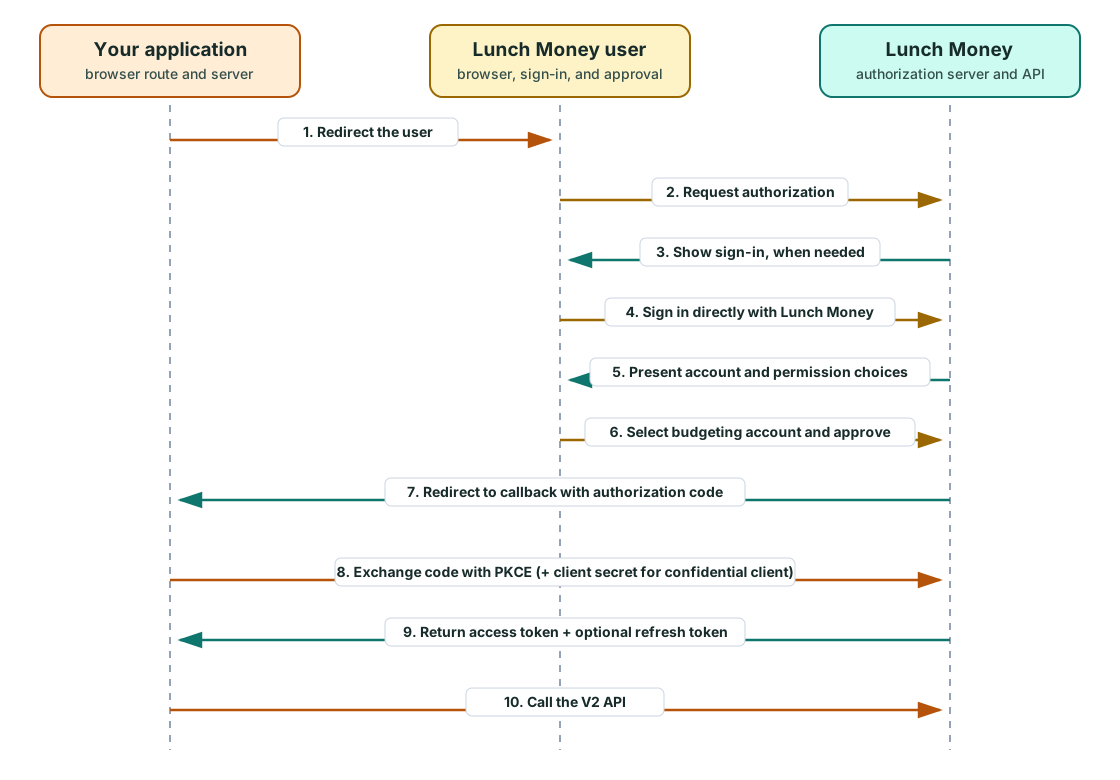
OAuth lets your application access Lunch Money on behalf of a user without asking that person to copy and share a personal access token. If you are building an application for anyone other than yourself, use OAuth. It gives each user a familiar Lunch Money sign-in and consent experience while keeping their personal access token out of your application.
| Question | Personal access token | OAuth application and client |
|---|---|---|
| Whose data can it access? | One budgeting account belonging to the user who created the token | One budgeting account selected by each user who authorizes the application |
| Best fit | API exploration, one-off scripts, and short-lived work on your own account | Persistent integrations and applications intended for other users |
| How is access granted? | The user creates a token on the Developers page in the Lunch Money web app | The user signs in and approves the permissions requested by the application |
| Credential handling | The user keeps the token and sends it with their own API requests; third-party applications should use OAuth instead of asking users to share one | The authorization flow delivers application-specific tokens without asking for a personal token |
| Permissions | Full access to the Lunch Money APIs available for that budgeting account, with no fine-grained permission controls | Only the permissions selected when the application was created |
| Lifecycle | Created and revoked by the user | Short-lived access tokens and optional finite refresh access; the user can revoke the application's access |
Personal access tokens remain useful for quick work on your own account. OAuth is the recommended model for applications and integrations that other Lunch Money users will connect to, as well as automations that need to run over time.
When a developer creates an OAuth application, they select the scopes—the specific permissions—the application needs. Later, when a Lunch Money user authorizes the application, Lunch Money shows them that complete permission set before they approve access. Choose only the permissions the application's features require. A focused permission request is easier for users to understand and trust, and reduces the risk of the application reading or changing data it does not need.
You need an active Lunch Money account to register and manage an OAuth application. During development, only the application owner can authorize it. Approval is required before other Lunch Money users can authorize it.
Start with OAuth concepts, register a client, and then implement the authorization-code flow. Use the scope catalog to plan permissions and troubleshooting when a flow fails.